Slash commands
Type / in the chat to switch modes, run workflows, manage context, open settings and call your own commands and skills.
Type / at the start of a message to open the command menu. Keep typing to filter it, then press Enter to run a command.
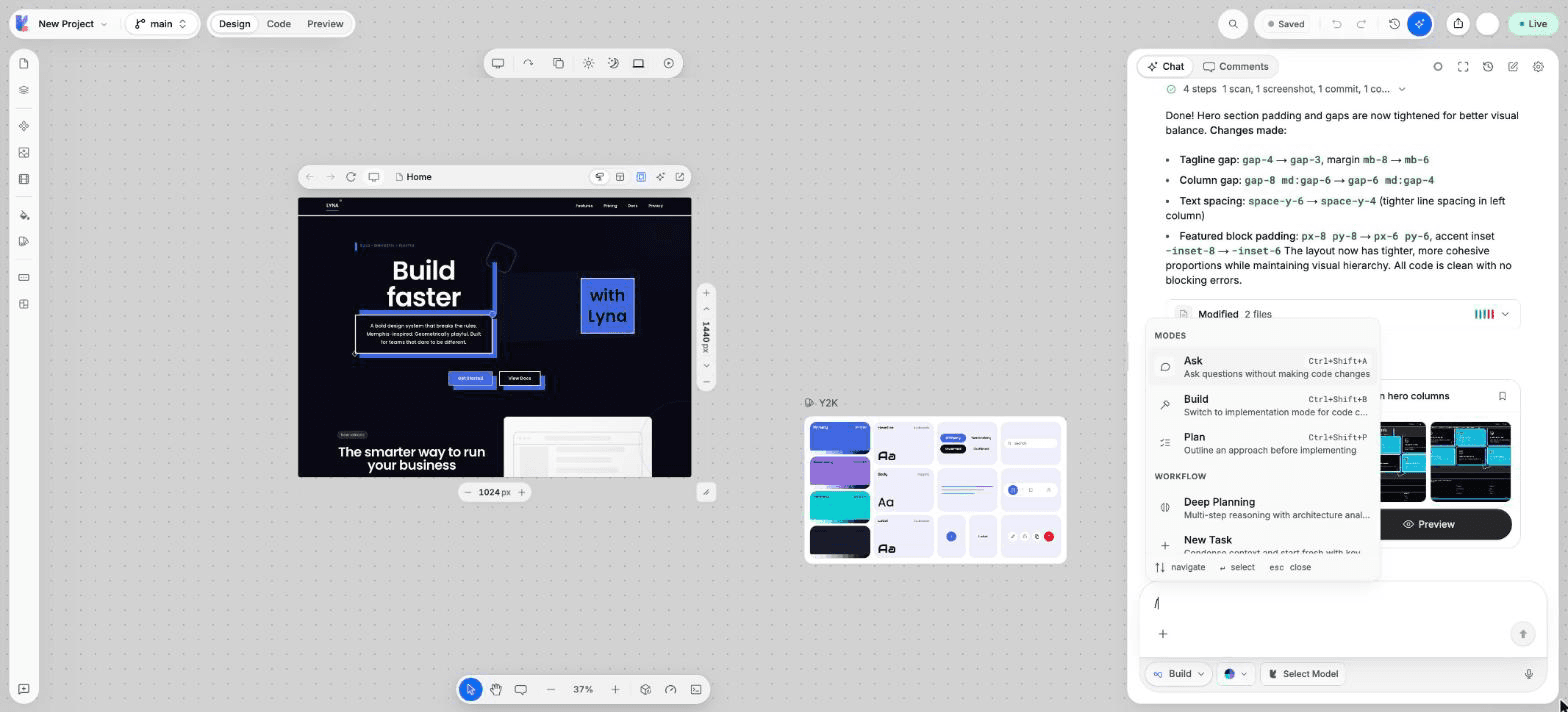
Modes
| Command | What it does |
|---|---|
/build | Switch to Build mode to make changes. |
/plan | Switch to Plan mode to outline an approach first. |
/ask | Switch to Ask mode to ask without changing code. |
Workflow
| Command | What it does |
|---|---|
/deep-planning | Multi-step reasoning with an analysis of the project structure. |
/newtask | Condense the context and start fresh with the key information. |
/newrule | Create or edit project rules. |
/fix | Analyze errors and fix them. |
/review | Review code changes for quality and correctness. |
/refactor | Restructure code safely, then check the result. |
/iterate | Improve existing code or UI in small rounds. |
Context
| Command | What it does |
|---|---|
/explain-changes | Read the Git changes and summarize their intent and impact. |
Actions
| Command | What it does |
|---|---|
/clear | Start a new conversation. |
/compact | Summarize the conversation to save tokens. |
/screenshot | Capture the preview and add it to the chat. |
/fix (Doctor) | Detect and fix errors in your code. |
/knowledge | Open project knowledge. |
/figma | Import designs from Figma. |
/rules | Open the project's AI rules. |
/skills | Browse and manage skills. |
/mcp | Turn MCP servers on or off. |
/hooks | Turn hooks on or off. |
/api | Call REST, GraphQL, Auth or Storage endpoints of your Lyna Cloud backend. |
/model | Switch the AI model. |
/effort | Set the thinking effort. |
/context | Show how many messages and tokens the conversation holds. |
/diff | Show the files changed in this session. |
/help | List all commands. |
Commands with a submenu (Skills, MCP Servers, Hooks and API) open a second list. Choose Back to return.
The API command
/api builds a request to your project's backend for you. Pick REST, GraphQL, Auth or Storage, then an action such as List rows or Insert row. Actions that change data (insert, update, delete) ask for your approval before they run. Your project needs a database connected in project settings.
Your commands and skills
- Your commands appear in their own group, marked User or Plugin. Create them in Settings > AI > Customize > Commands.
- Skills can be called by name: type
/and the skill name.
A slash with no match stays text
If nothing matches what you typed after /, pressing Enter sends your message as plain text.