Styles
Edit every visual property of the selected element, from size and layout to typography, effects and animations. Changes are saved as Tailwind CSS classes.
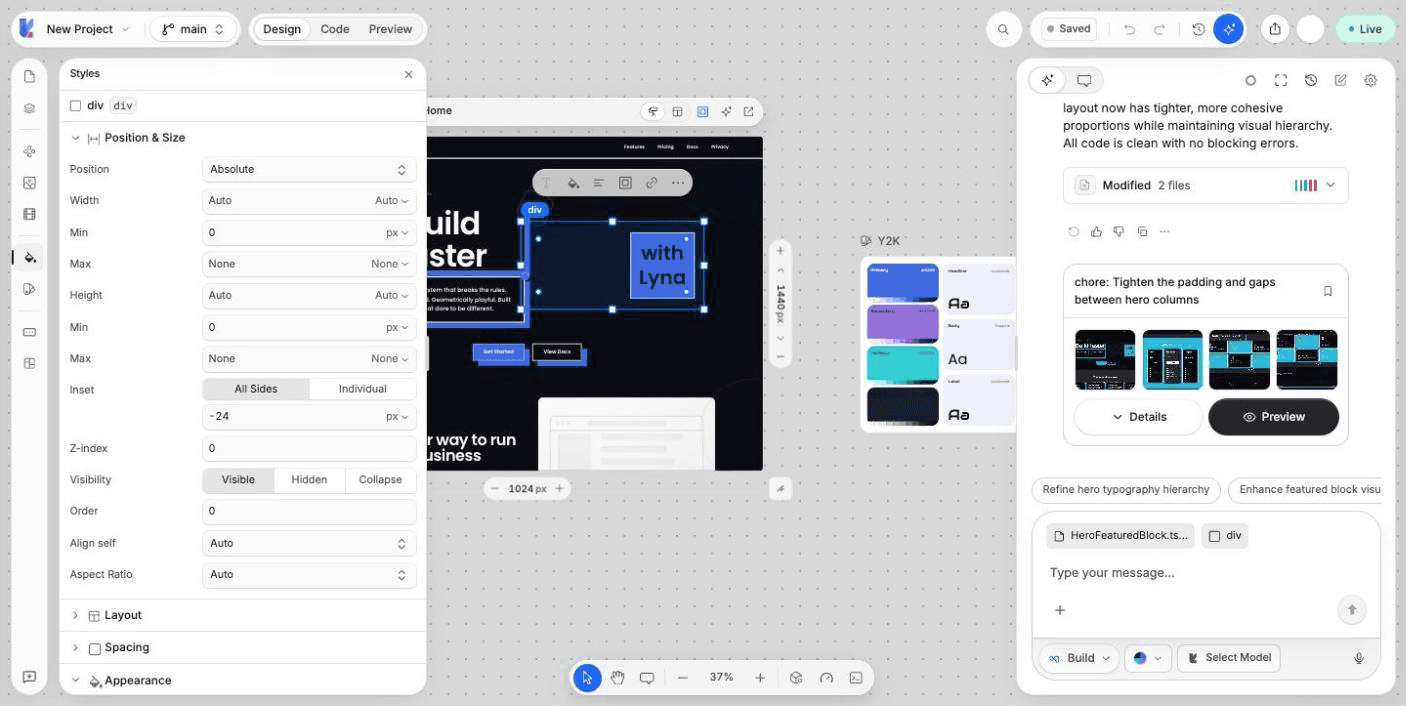
The Styles panel lists every style property of the selected element, grouped in sections. You see the change on the canvas right away, and Lyna writes it to your code.
What you can do
- Set the size, position and layout of an element.
- Change its spacing, colors, background, borders and text.
- Add shadows, filters, transforms and animations.
- Add hover, click, appear and loop effects.
- Undo any change with
Cmd/Ctrl + Z.
Edit a style
Select an element
Click an element on the canvas or in the Layers panel. The top of the panel shows its name and tag.
Open the Styles panel
Choose Styles in the left rail, or All styles in the element toolbar, or Open Styles in the right-click menu.
Change a value
Open a section and change a value. Type a number, drag a slider, or pick an option. The canvas updates as you go.
Sections
| Section | What it covers |
|---|---|
| Position & Size | Width, height, minimum and maximum sizes, aspect ratio and position (static, relative, absolute, fixed, sticky). |
| Layout | Display (block, flex, grid and more), direction, alignment, wrap and gap, grid columns and rows, overflow and object fit. |
| Spacing | Padding and margin, on all sides at once or one side at a time. |
| Appearance | Background color or gradient and opacity. |
| Background image | An image behind the element, with its size and position. |
| Borders | Border width, style, color and corner radius. |
| Typography | Font, size, weight, color, alignment, line height, letter spacing, case, decoration, wrapping, truncation and list style. Opens by itself for text elements. |
| Visual Effects | Shadows and other visual effects. |
| Filters | Blur, brightness, contrast and other filters. |
| Transforms | Move, scale, rotate and skew. |
| Animation | A continuous CSS animation. |
| Interactivity | Pointer behavior: the mouse pointer shape, whether the element is Clickable, text selection, and resize. |
| SVG | Fill and stroke. Shows only for SVG elements. |
| Interactions & Effects | Effects that start on hover, on click, when the element appears, or in a loop. |
Interactions and effects
In Interactions & Effects, pick a Trigger (hover, click, appear or loop) and an Effect, such as Fade In, Slide Up, Scale In or Blur In. Set the Duration and Easing, then choose Preview Effect to see it. Apply Effect adds it to the element as Tailwind CSS classes.
To see animations on the canvas, choose Play animations in the frame toolbar. Animations are paused while you design.
How styles are saved
Lyna saves your edits as Tailwind CSS classes in the className of the element in your source file. When a class already sets the same property, Lyna replaces it instead of adding a second one.
Quick edits from the canvas
The floating toolbar over a selected element covers the most common changes: Text style, Color (Text, Fill, Border), Alignment, Spacing and Link. See Canvas.
Shortcuts
| Action | Shortcut |
|---|---|
| Undo / Redo | Cmd/Ctrl + Z / Cmd/Ctrl + Shift + Z |
| Show distances to other elements | Hold Alt |
| Show or hide the left panel | Cmd/Ctrl + / |
Next steps
Layers
See the element tree of every frame, find an element by name or type, hide it, reorder it by dragging and add blocks between rows.
Brand and design system
Set the colors, fonts and corner radius of your whole project from one seed color, save brands you like, and import a design system from screenshots, a website, your code or Figma.