Projects
Search and organize projects
Find any project with search, filters, sorting and views, and keep your workspace tidy.
The projects page gives you several ways to find a project fast.
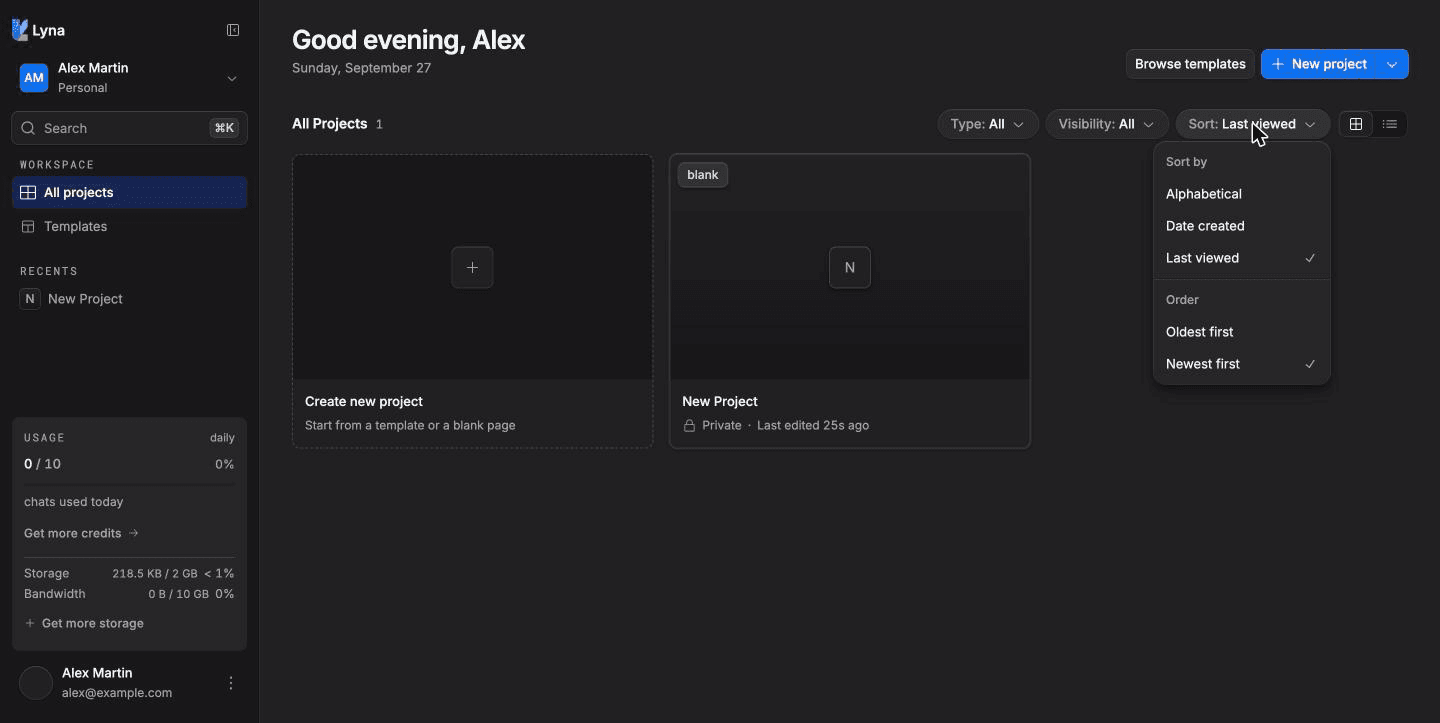
What you can do
- Search projects by name.
- Filter by type and visibility.
- Sort by name, creation date or last viewed.
- Switch between grid and list.
- Jump to recent projects.
- Switch workspace to see another set of projects.
Search
Choose Search in the sidebar and type part of a project name. Matching text is highlighted in the results. Choose Clear search to see everything again.
Filter
In the toolbar:
- Type: Site, Tools, Personal, Consumer, B2B, Prototype or E-commerce.
- Visibility: Public, Workspace or Private.
Choose Clear filters to reset both.
Sort and view
Open Sort and view:
| Option | Choices |
|---|---|
| Sort by | Alphabetical, Date created, Last viewed |
| Order | Newest first, Oldest first |
| View | Grid view, List view |
The list view shows each project's Name, Owner and when it was last Edited.
Recents
The Recents group in the sidebar lists the projects you opened last.
Keep projects organized
- Set a category and tags for each project in Settings > Project > General. The Type filter uses the category.
- Use one workspace per team or client.
- Give each project a clear name. Rename it from the editor's project menu.
Command palette in the editor
Inside a project, press Cmd/Ctrl + K to open the command palette and search commands, files and settings.