Custom domains
Connect a domain you own to your published site. Add the DNS records Lyna gives you, check them, and HTTPS turns on by itself.
A custom domain puts your published site on an address you own, such as example.com or app.example.com. Custom domains are available on the Pro plan.
What you can do
- Connect an apex domain (
example.com) or a subdomain (app.example.com). - Copy each DNS record with one click.
- Check the DNS setup and read the result.
- Get HTTPS automatically once the domain is verified.
- Reconnect a domain you verified before, without new records.
- Remove a domain.
Before you start
- Publish your site once. A domain connects to a published site.
- Have access to the DNS settings at your domain registrar or DNS host.
- Be on the Pro plan.
Connect a domain
Open Domains
Open Settings > Project > Domains and choose the Custom tab. You can also choose Add custom domain in the Publish menu.
Add the domain
Under Add a domain, enter the domain, such as example.com, and choose Set up.
Add the DNS records
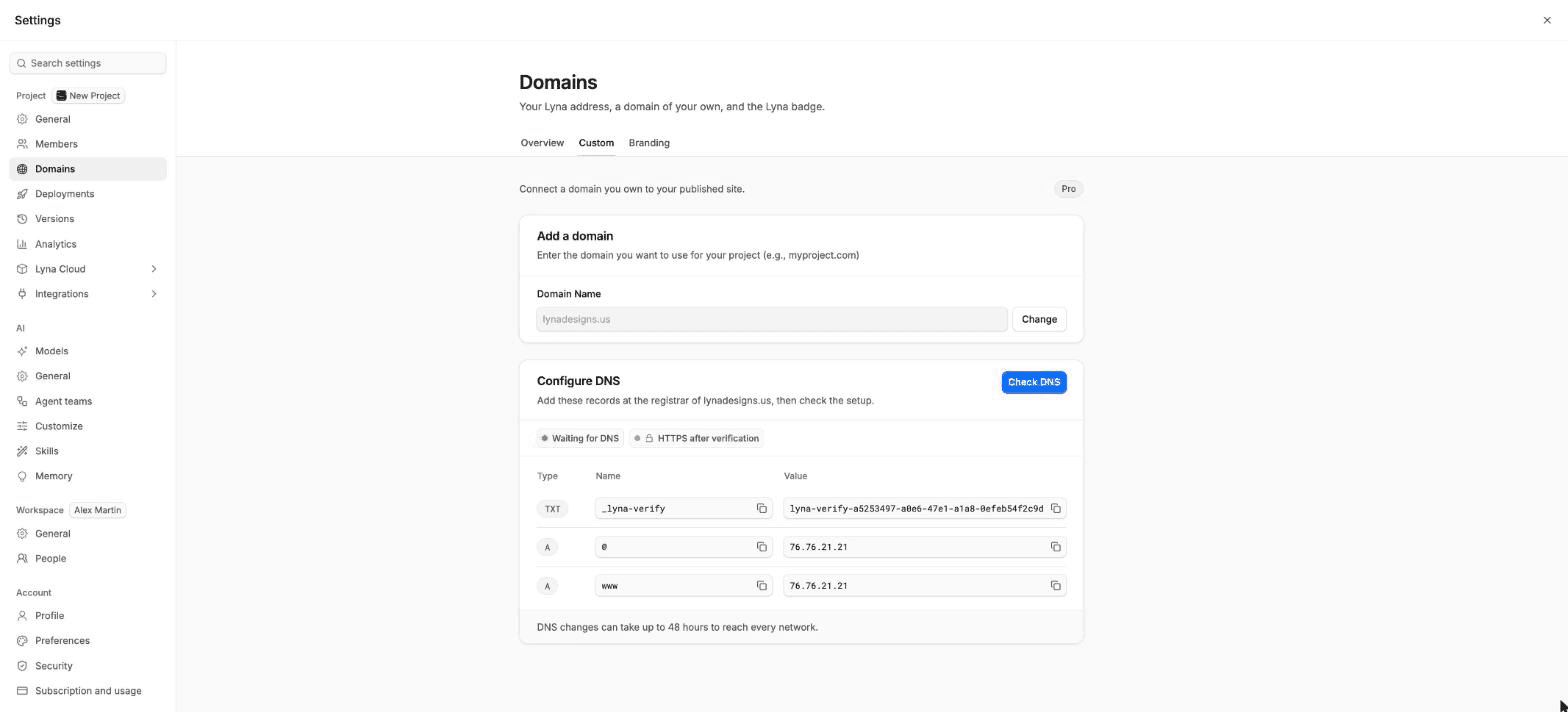
Configure DNS lists the records to add at your registrar. Copy each Type, Name and Value with its copy button.
| Your domain | Records to add |
|---|---|
Apex, such as example.com | A TXT record to prove you own it, an A record for @ and an A record for www. |
Subdomain, such as app.example.com | A TXT record to prove you own it and an A record for the subdomain. |
Use the exact values the dialog shows.
Check DNS
Choose Check DNS. The status goes from Waiting for DNS to Checking DNS, then DNS verified. If the check fails, the result lists each record that is missing or has the wrong value.
HTTPS turns on
Once the domain is verified, Lyna issues the certificate. The status shows HTTPS active. Your site now answers at your domain.
DNS takes time
DNS changes can take up to 48 hours to reach every network. If the check fails right after you add the records, wait and choose Check DNS again.
After it connects
The Connected domain card shows when your site was last published to the domain. Each publish updates both your Lyna address and your custom domain.
Remove a domain
Choose Remove domain and confirm. Your site stops answering at that domain. You can connect it again later: domains you verified before appear under Previously used domains and connect without new DNS records.
Troubleshooting
| What you see | What to do |
|---|---|
| DNS check failed | Compare each record at your registrar with the dialog. Remove old A or AAAA records for the same name. |
| HTTPS after verification | Nothing: the certificate is issued once DNS is verified. |
| HTTPS not issued | Check that no other service holds the domain, then check DNS again. |
| The domain opens another site | An old record still points elsewhere. Delete it and wait for DNS to update. |