Sharing and visibility
Choose who can see a project (Public, Workspace or Private), share it with people, and see who is in the project with you.
Visibility decides who can see a project. Sharing gives people access to work on it.
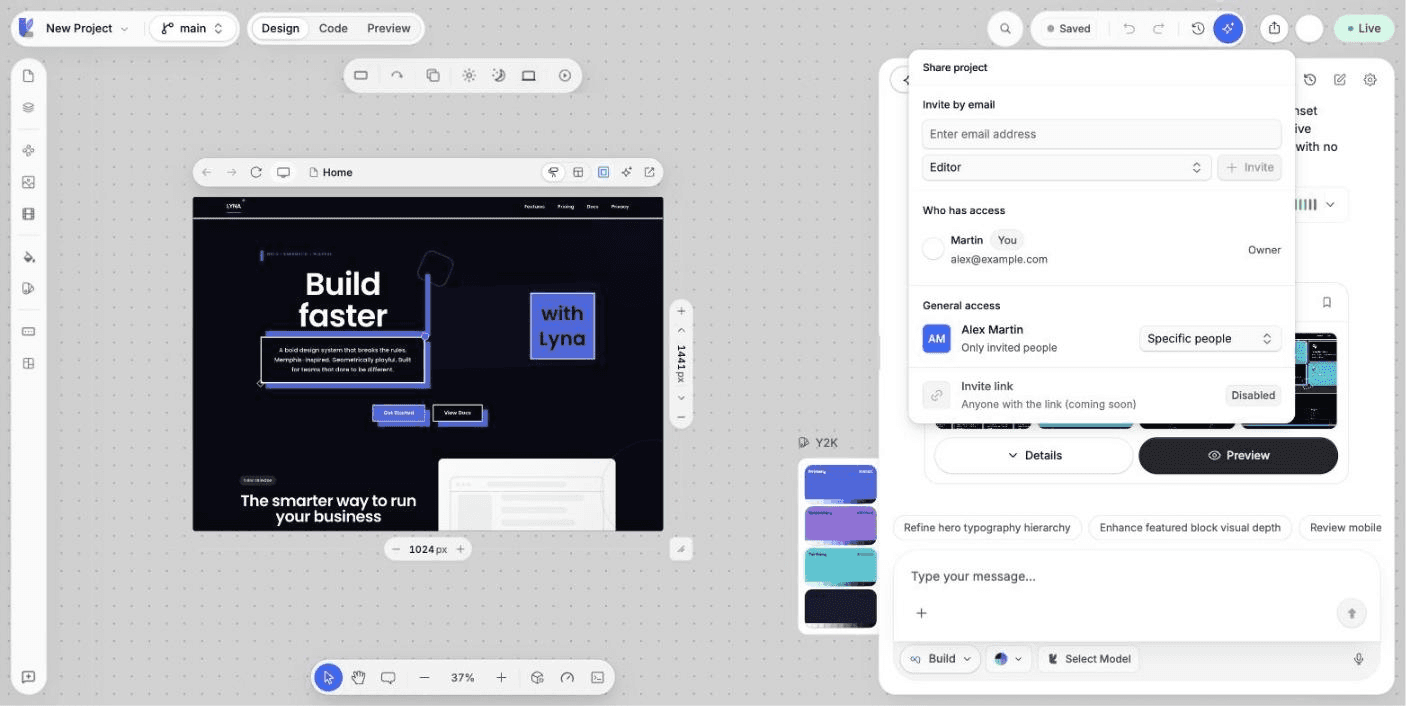
What you can do
- Set a project to Public, Workspace or Private.
- Share it with members of your workspace, or invite people by email.
- See who has access, and change their role.
- See who else is in the project right now.
Visibility
Set it in Settings > Project > General under Visibility & Category.
| Visibility | Who can see it |
|---|---|
| Public | Anyone, once the project is published. Public projects can appear in the Explore gallery and on your public profile. |
| Workspace | Only members of the workspace. |
| Private | Only you, and the people you add. |
Pick a Project category there too. It helps people find a public project in the gallery.
A project that is flagged for review shows Review as its visibility until the review is done. See the Moderation Status section in project settings.
Share a project
Open Share
In the editor top bar, choose the share button. Only editors and above see it.
Choose general access
- Everyone in workspace: every member gets access from their workspace role.
- Specific people: only the people you add.
Add people
In a team workspace, choose Add members and pick a workspace member. To add someone new, invite them to the workspace first in Settings > Workspace > People.
In your personal workspace, choose Invite by email and enter their address. See Invitations.
Who has access lists everyone with their role. Change a role or remove someone from the list. See Members and roles.
See who is here
When teammates open the same project, their avatars appear in the top bar.
Next steps
Deployments
See every publish of your project with its status, duration and security score, read its build log, redeploy or cancel it, and take the site offline.
Comments
Pin comments to elements on the canvas, reply in threads, resolve them when done, and comment on public projects in the Explore gallery.