Invitations
Invite people to a workspace or a project by email, copy or resend an invite link, change a pending invite's role, and accept an invitation you receive.
Invite people by email. They get a link that lasts 7 days.
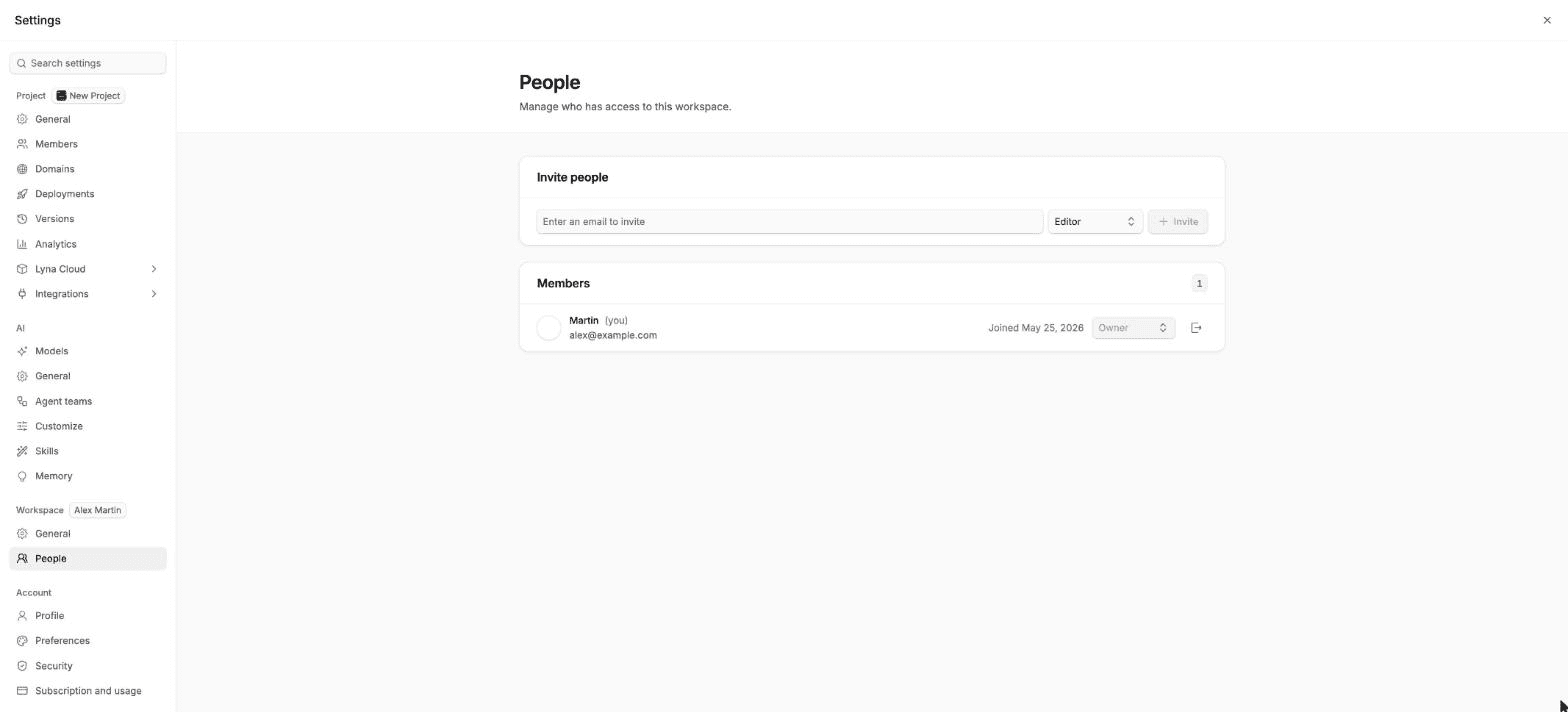
What you can do
- Invite someone to a workspace with a role.
- Invite someone to a project in your personal workspace.
- Copy, resend or revoke a pending invitation.
- Change the role of a pending invitation.
- Accept or decline an invitation you receive.
Invite to a workspace
Open People
Open Settings > Workspace > People.
Enter an email and a role
Type the address, pick a role and choose Invite. Owners and admins can invite any role up to their own. Editors can invite viewers.
Follow it
The invitation appears under Pending invitations as Awaiting response until the person accepts.
Each pending invitation offers Copy invite link, Resend invitation and Revoke. Owners and admins can also change its role.
Invite to a project
- Team workspace: people join the workspace first. Then add them to the project from the share button with Add members.
- Personal workspace: in the share button, choose Invite by email. You need the Admin or Owner role on the project, and you cannot invite someone with a role higher than yours.
Accept an invitation
Open the link
Open the link from the email. Sign in, or choose Create an account if you are new to Lyna. The invitation waits for you.
Use the invited address
Sign in with the email address the invitation was sent to. With another address, Lyna tells you which one to use.
Accept
Choose Accept invitation for a workspace, or Accept and open the project for a project. You can also Decline.
An invitation expires after 7 days. If a link says it has expired or was revoked, ask for a new one.